The Callaway uPro MX+ has been retired. Check out our current recommendations for today's best golf rangefinders..
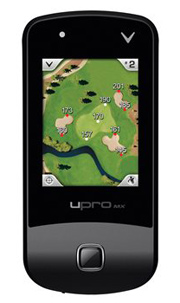
Previously, our Callaway uPro MX+ Review made a strong recommendation for choosing another product. However, given the extreme price drop, large feature set and resolved issues on the Callaway uExplore website, we now think this product is worthy of consideration. Read our latest thoughts about the uPro MX+.
Callaway uPro MX+ User Rating:
 3.28 out of 5 (35 reviews)
Score compiled from multiple sources.If you don’t remember, in June 2011, Callaway released the much anticipated uPro MX. The device itself might well have been a big hit, but Callaway was never able to get website problems resolved for many users, who were then unable to download Pro Mode courses. They ended up issuing a voluntary recall. It seemed a sad end to a potential superstar in the golf GPS game.
A year later, Callaway believes they have not only resolved the website problems, but improved the device and given it a new name… the Callaway uPro MX+. To be honest, we think it would have been better to change the name completely to avoid confusion as buyers are reading online reviews, but we’re hoping that’s the only mistake they have made this time.
- Preloaded with 25,000+ golf courses in Basic Mode and Go Mode
- Three operating modes:
- Basic Mode is large numbers only to front, middle, back and hazards. This could be useful if someone in the family has difficulty seeing yardages in other modes
- Go Mode looks great for people who don’t want to get bogged down in the details or who are familiar with the course they are playing. Aerial views are nice, but the meat of the GPS is right here. You can see the green shape and surrounding hazards. You can touch any point on the green to get distance to the place where you think the pin is. In our opinion, this may be the mode that users will love and use the most.
- Pro Mode shows actual aerial views of each hole and allows you tap any point on a hole to see how far it is to that point and how much further to the green. If you’re not familiar with a golf course, these aerial views can be invaluable. Other golf GPS devices have renderings, which may be equally useful, but they don’t give you the ability to play in the simpler “Go Mode”.
- In our opinion, there is conflicting information about Pro Mode on Callaway’s website. In one place, it states “No fees or subscriptions (unlimited course downloads in ProMode)”. In another, there is a mention of fees. We’ve contacted Callaway about the issue and hope to hear back soon.
- Pro Mode courses have to be downloaded from the Uexplore.com website.
We’re looking forward to seeing how well the Callaway uPro MX is received by users and will post our review soon. If you’re looking for Full-featured GPS that’s already been put to the test, take a look at our Comparison of Top-Rated GPS Models.
| Callaway uPro MX+ | ||
|---|---|---|
| Course Download Fees | No* | |
| Pre-loaded with Courses | Yes* | |
| Full Hole Views | Yes | |
| Slope / Elevation | N/A | |
| Battery Life | N/A | |
| Battery | N/A | |
| Size (Width x Height x Depth) | 4.09 in. x 1.97 in. x .65 in. | |
| Measure Shot Distance | N/A | |
| Screen Size | N/A | |
| Resolution | N/A | |
| Display Type | Color | |
| Weight | 3 oz. | |
| Rainproof | N/A | |
| Touch Screen | N/A | |
| Touch Targeting | N/A | |
| Manual Pin Positioning | N/A | |
| Stat Tracker | Yes | |
| Digital Scorecard | Yes | |
| Computer Analysis Tools | Yes | |
| Ground Verified | No | |
| Alternate Targets | Yes | |
| Green Rotates to your shot angle | N/A | |
| USGA Compliant (local rule) | Yes | |
| Notes | ProMode provides actual aerial views (not renderings) of each hole with flyovers and Anypoint technology for shot planning. | |
| Order Golf Rangefinders from Amazon | ||
| GolfRangefinderShop.com is a participant in the Amazon Services LLC Associates Program. If you buy anything after clicking through, we get a small commission at no extra cost to you. It helps us keep the site up and running, so thank you! We work very hard to obtain the correct information about product features, but cannot make any guarantees about the accuracy. Please double check with the merchant or manufacturer before making a purchase. | ||
 Talkin' Golf on Google+
 Reviews on YouTube
 Twitter
 Like us on Facebook
 RSS
RSS
I just bought a UPRO MX+ two days ago. They are stilling having the same problem, for 2 days I tried n tried, use diff pc, reload, reinstall the upro sync software but the new upro is still unable to register, sync, download……
Nothing is working ….very disappointed with Callaway
Sorry to hear it. It may cost a little more to get something that’s easier to use, but with no fees and less headaches, the Garmin G5 would seem like a better option.
I bought one of these a week ago and have used it on two different courses. I used the GPS and stat tracking features and thought it was simple to use and very accurate. I have several different Garmin GPS devices (none of them golf related) and if I had been shopping for a GPS for golf, I would most likely have bought a Garmin device. This was an impulse buy – as i was checking in for a round of golf, the pro said I could have the MX+ for $129, and the round of golf ($75) would be free. So basically I paid $54 for the uPro MX+. I am happy with the device. I was able to easily download the pro version of the two courses I have played since buying it, and as I said – the accuracy is there.
Jeff, thanks for the feedback. I think I would have jumped on that deal too! Glad it’s working for you.
I picked up the mx+ and it took sometime to sync mainly because my firmware and java were not up to date. Other than that it was simple to register and set up pro mode courses. Going to play tomorrow but so far so good. Plus it was $49.99.
I called callaway tech support and they were very helpful sending me the links for java and firmware. They stayed on the phone the entire time. For this I recommend.
Thanks Shane. Glad to hear Callaway is giving good support for this unit. The price sounds hard to beat. I hope it continues to serve you well.
I bought a upro mx+ to replace an iGolf Neo that suddenly refused to sync with my computer(after 5 years!). After spending two evenings un-installing and ‘re-installing the iGolf software to no avail, I gave up and bought the Callaway unit for $51.00. No problems with the install. Played 2 rounds with it. Performed as advertised, allowing for the learning curve. Finding distances to hazards, doglegs, and lay-ups is a bit awkward in Pro mode, but that should improve with practice. The video fly-over mode could be useful on unfamiliar courses, but it would be nice if there was a way to slow it down or easily repeat it. Yardage seemed pretty good, at least as good as my partner’s Garmin. All in all, a great value at a great price.
Thanks Three Putt Bob! Glad to hear you are happy with the uPro mx+. We agree, it’s an incredible value!
I had a sky cddie for 6 years…was completely satisfied…other than paying a yearly fee of $50.00.. Guess the kids got sick of my complaining so they gave me a gift certificate to buy a different one from Golf galaxy.. Went in and was shown several models but decided on callaway..because of their reputation in golf equipment….owning several of their woods and utility clubs and also use the golf balls…I have used it for a year and I still hate it….changes holes in the middle of the round and goes in the sleep mode too often….my golfing friends also get very upset with it….very,very frustrating.thought that a company that had been in the golf business for so long certainly would have perfected a product before putting it on the market….never heard of the recall of this product
Thanks for the feedback. Sorry you’re not happy with your Callaway GPS. Garmin definitely gets the best ratings in the full-featured handheld category. If you’re not using all the features, consider trying the GolfBuddy Voice+, the Bushnell neo+ or the Izzo Swami 4000.
Just bought the Upro mx range finder last week on ebay. need to get a copy of owners operating manual. have not tried to use it yet . hope it works good. I will try to down load operating instructions if I can find them.
Here’s a manual for the Upro MX. https://www.manualslib.com/manual/631411/Callaway-Golf-Upro-Mx.html
I hope you have good luck with it!
My Callaway York mx+ locks up on a Nicole after my course is picked on the menu and I enter play golf hole numbers won’t change manually or at all. Any suggestions?
You can always try taking the battery out for a few minutes. Unfortunately, I doubt there are many good options for you with an older model like the uPro MX+.