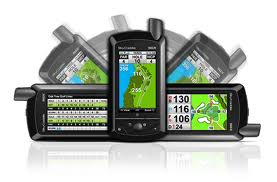
 SkyGolf, a leading maker of GPS Golf Rangefinders, has added a new feature to its latest golf rangefinder, the SkyCaddie SGX. The SGX already boasts a rich user experience with HoleVue, Intelligreen and Intelligreen Pro technologies, but this latest software update takes a page out of the smartphone playbook and adds an element of user friendliness to the SGX experience. Autoview takes advantange of the device’s built-in accelerometer and senses when the user rotates the SGX to the right or to the left. Rotating the GPS rangefinder to the right now gives the user a landscape detailed view of the green using the Intelligreen technology. Rotating it to the left gives a landscape view of the scorecard for easier entry and viewing. We’ll look forward to seeing how users respond to this update.
If you’re an SGX owner, you’ll need to sync your device with CaddieSync and then re-download your courses. Turn off your SkyCaddie, unplug and disconnect from the computer. When you turn it back on, the Autoview update should be ready to go.
Read our SkyCaddie SGX Review Summary.
 Talkin' Golf on Google+
 Reviews on YouTube
 Twitter
 Like us on Facebook
 RSS
RSS