

Bushnell V3 vs Z6

Bushnell V3 vs Z6
The article below compares the Bushnell V3 vs Z6 however, both of these models have been retired. If you are looking for current models, check out our Best Laser Rangefinder list!

If you’re trying to decide between the Bushnell V3 vs Z6, there are a few key differences to think about. First, there’s a big price difference. The Bushnell Tour Z6 with Jolt costs significantly more than the Tour V3. For the difference, the Z6 better be pretty special…

Admittedly, there are a few features that we really like on the Z6.

  • The Z6 has a 6x magnification level vs the 5x on the V3.
  • The Z6 can range the flag at 450 yards, while the V3 can only hit it at 300 yds.
  • The Z6 has VDT (Vivid Display Technology) that displays the information in red, which is easier to read than the black found on the V3.
  • The Z6 has ESP (Extreme, Speed, Precision), which makes it faster and precise down to the half yard.
    1. Frankly, we love all of those features and if price wasn’t a factor, it would be an easy choice. Both models now have Jolt technology which causes a vibrating burst in the unit when you’ve locked on to the target, but the most important thing to know is that BOTH OF THESE LASER RANGEFINDERS ARE ACCURATE. The Bushnell V3 is one of the highest rated golf rangefinders ever and it weighs less than the Z6.

      Let’s just say that both of these rangefinders are excellent. The V3 is a better value, but the Z6 is a little easier to use, a little easier to read, and a little faster., Of course, if you’re a big hitter who needs to know those longer distances from time to time, the Z6 can deliver something that the V3 cannot – distances over 300 yards.

      If you’re trying to justify spending the extra money for the Z6, think about this… Golf Rangefinders can last a very long time and the improvements you’ll see in this technology over the next decade isn’t really going to change that much. So if you buy the Z6 and use it for 5 years, the difference in price per year is incredibly low. And if your eyes happen to deteriorate in that time, or if you start hitting it longer and are driving those par 4s, the extra money will have been especially well spent!

      Read Our Full Reviews:

      Model
      Read Review
      Price
      Our Summary
      GRS Score
      USGA Compliant (local rule)
      Slope
      Height
      Width
      Depth
      Weight
      Magnification
      Rainproof
      Sound or Vibrate
      Display Type
      Battery
      Battery Life
      Minimum Range
      Maximum Range

Callaway Diablo Rangefinder Battery

“Diablo Octane Battery”

Bushnell Tour V4 Replacement battery
Order the Bushnell V3

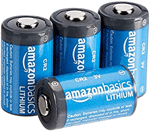
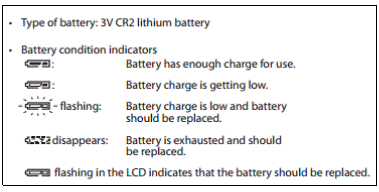
You won’t need to replace your Callaway Diablo rangefinder battery too often, but you definitely don’t want to be caught on the course without a spare. This rangefinder uses a 3-volt lithium CR2 battery. We put the instructions below for how to read the battery indicator and replace the battery.

If you get familiar with the battery indicator, you can replace the battery before it dies in the middle of your round.

Replacing the Callaway Diablo Octane Battery

  1. Open the battery chamber cover – Use the ball of your thumb or a coin inserted into the recessed part of the battery cover, to rotate the cover in the direction indicated by the Open/Close arrow. It may not open easily due to its rubber packing for water resistance.
  2. Replace the old battery with a new one – Install new battery with the [+] and [-] correctly positioned following the “Battery installation” indication seal in the battery chamber. (The [+] pole goes towards the insider of the chamber.)
  3. Close the battery chamber cover – Align the Open/Close indicator with the white dot and insert the battery chamber cover. Using the ball of your thumb or a coin, turn the cover in the opposite direction to the arrow indicator. It may not close easily due to the rubber packing for water resistance, but continue to turn it all the way until it stops. Confirm that the cover is securely closed.

Callaway Diablo Octane Rangefinder battery indicator

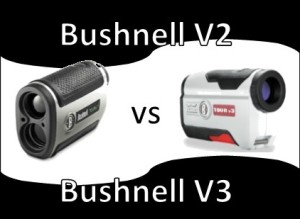
Bushnell V2 vs V3

Both the Bushnell V2 and V3 have been retired. Check out the latest Bushnell Laser Golf Rangefinders!

Bushnell V2 vs V3Not so long ago, the decision on buying a Bushnell V2 vs V3 laser rangefinder was a more relevant discussion. The short story was that the V3 was newer and added one impressive new feature, but cost a little more. You made your decision based upon how much you valued the new feature (we’ll get to that in a minute). Now, the V2 is getting hard to find and when you do find it, the prices aren’t necessarily any better than the V3, making the decision pretty much a no-brainer.
However, if you happen to catch a great price the V2, then “Game On”! So what’s the difference? The Bushnell V3 has “Jolt” technology, which means the unit has a series of vibrating bursts when it locks on to the target, making it a little easier and faster to gain confidence that you’ve got the right distance. Other than a few cosmetic changes, these two models are nearly identical. Both the V2 and the V3 are available with and without slope.

Experienced laser rangefinder users may not be willing to pay much more for Jolt, but if you’re new to laser or have any trouble holding it steady, it’s probably worth the price difference to buy the Bushnell V3.


The Distances on My Golf GPS are Wrong!

Golf GPS is not 100% accurate.It’s important to say that most golf GPS owners have far more good things than bad to say about their devices. However, there are always a few complaints for every device that say something like this… “The distances on my golf GPS are wrong!” OR “The yardage is way off on the 5th hole at my course” and other variations on this theme. Make no mistake, getting the distance right is the most important feature of these devices, so this is a big deal.

The first thing you need to understand is that there aren’t any golf GPS devices that are perfect. All of them are “off” some of the time. Unlike laser, GPS isn’t always accurate down to a couple of yards. Apparently things like weather and trees and course maps all affect your golf GPS, yet amazingly, most of them are accurate to within about seven yards (I’m guessing) most of the time.

There are a few things you can do to improve the performance of your golf GPS.

  • Make sure you update the maps once or twice a year. Not only are courses being added all the time, updates to the existing maps are being made as well. While you’re at it, check to see if there are any firmware updates that can be made to your device.
  • If you find a hole or a course that has bad distances, report it to the manufacturer of your device.
  • On some devices you can update the locations on your device of the front, middle and back of the greens. Some of them also allow you to add points to the maps. If you have a consistent problem on a course you play frequently, you’ll want to use this feature.
  • Wait for it! It takes most GPS devices a few seconds or more to “settle”. Don’t pull up in your cart and assume the distance will be immediately correct, just wait a few seconds before pulling your club.
  • Take in your surroundings to see if there are any easy to see clues that might reassure you of your distance. You might see a 150 yard pole ten yards in front of you or a sprinkler head nearby.
  • If your distances seem to be way off all the time and your device is under warranty, you’ll probably want to return it as it may be defective.

For most of us, a golf GPS is going to help us way more often than it hurts us and being “off” a few yards now and again won’t even be noticeable. However, low handicap golfers and others who desire accuracy to within a couple of yards every single time, will likely be much happier with a laser rangefinder.

Garmin G6 vs SkyCaddie

Here, we will breakdown the differences of the Garmin G6 vs Skycaddie SGX and SGXw, but we can tell you up front, that we think there is a very clear winner.

Garmin G6 vs SkyCaddieSince we feel so strongly about this, we don’t want to waste your time by making you read through to the end, before giving my bottom line, so let’s start there!

The SkyCaddie SGX and SGXw have terrible user reviews and they make all those unhappy buyers pay annual fees. On the other hand, the Garmin gets excellent user reviews and doesn’t charge any fees ever. On that note, the winner is…. the Garmin G6. Yes, it may cost a little more on the front end, but you are likely to have less headaches and spend a lot less over the lifetime of the device.

Other than price and user ratings, there are a few differences between the Garmin G6 and the two Skycaddie SGX models.

  • The screen size on the G6 is 2.6″ and it’s 3″ on the SkyCaddie. Although only a little larger in screen size, the SkyCaddies are otherwise quite a bit larger than the Garmin.
  • The G6 has a nice touchscreen, while the SkyCaddie SGX has a little joystick and the SGXw has an optical trackpad.
  • All three units have bright color displays and allow you to get distance to any point.
  • SkyCaddie has Intelligreen and Intelligreen Pro technology. It’s not available on every course, but it’s nice technology when it is available. Intelligreen gives you a close-up view of the green shape and hazards from the angle you are approaching. On the Garmin, you get the close-up view of the green shape, but as far as we know, it doesn’t change with your angle. The Intelligreen Pro feature shows contours on the the greens, which is cool, but in all honesty, most golfers don’t have the time or ability to take advantage of this information.
  • The SkyCaddies have the ability to switch to a list view of hazards and targets, but switching screens, no matter how easy, isn’t preferable to having what you need on the main screen. The Garmin G6 shows a hole layout that includes those distances right on it, plus you can just touch the screen to the point where you want to layup and get the distance to that point and from that point to the hole. On the SkyCaddies, you have to get on the HoleVue™ screen and use the joystick or trackpad.
  • The SkyCaddie models also have the QuickVue™ and RangeVue™ screens that give you options for how you want to view your information… but seriously SkyCaddie, less is more! Sure this might be great for a geek who has six hours for every round, but for most of us, it’s just too much.
  • The Garmin G6 has a scorecard for up to four players and the SkyCaddies have a scorecard for one player. We figure most people will use a traditional scorecard when they are scoring for the group, so not really an issue. All three units allow you to track your stats.
  • All three units allow you to measure your shots and tag the club you used, so they can store the average distance you hit each club. All of these units also allow uploading the scoring and stats to your computer for analysis.
  • In summary, SkyCaddie just tries to do too much, making it expensive and potentially confusing for the players who use them. Garmin just makes it a little easier and without the burden of annual fees.

    Model SkyCaddie SGXSkyCaddie SGXwGarmin Approach G6
    Read Full Review Read Full ReviewRead Full ReviewRead Full Review
    Price Check PriceCheck PriceCheck Price
    GRS Score 3.60
    (367 Ratings)
    3.65
    (46 Ratings)
    4.20
    (648 Ratings)
    Height 4.8+ in.4.8+ in.3.7 in.
    Width 2.48 in.2.48 in.2.1 in.
    Depth .75 in..75 in..8 in.
    Weight 5.6 oz.5.6 oz.3.37 oz.
    Battery Li-polyLithium-ion PolymerRechargeable Li-Poly
    Battery Life 14 hrs maxN/Aup to 15 hrs.
    Rainproof water resistantwater resistantIPX7
    Pre-loaded with Courses Yes*Yes*27,000
    Instant Course Recognition YesYesYes
    Auto Hole Advance YesYesYes
    Course Capacity 50 Full50 FullUnlimited
    Touch Screen NoNoYes
    Stat Tracker YesYesYes
    Digital Scorecard YesYesYes
    Computer Analysis Tools YesYesYes
    USGA Compliant (local rule) YesYesYes, if Club Averages feature is not used.
    Alternate Targets YesYesYes
    Ability to Add Targets N/AN/AYes
    Measure Shot Distance YesYesYes
    # of Available Courses 30,000+30,000+29,500+
    Course Download Fees YesYesNo