If you haven’t done an update lately, you may want to check your version of SkyCaddie SGXw. An update was recently released and it includes some good stuff.
To see the latest version that is available for SkyCaddie SGXw, look here.
To see what’s included in the latest update, check here.
To check your version, go to Settings and then Click “Info”. See images below.
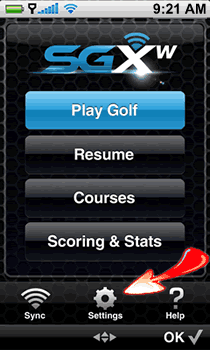
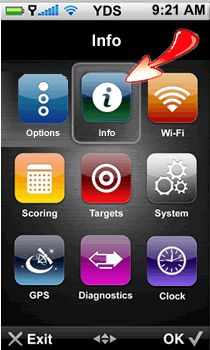
The Info option contains information related to your Membership and ID/Version of your SGXW. Membership detail includes: SkyCaddie Membership Plan, Serial Number, and Number of Courses currently stored on your SGXW. The ID/Version screen includes your name, SkyCaddie’s customer support phone number, the SGXw’s unique Serial Number and all applicable software versions currently installed.
Let us know what you think of the latest version in the comments below.
 The use of golf laser and GPS rangefinders has become so widespread, that you might not even realize that they are NOT always allowed.
  Practice on pins that are close. If your driving range has flags on it, take your laser rangefinder to the range and practice shooting the flags. Start with the closest flags and don’t move on until you consistently get the right distance. Make sure you that you target the “flag” and not just the pin. The flag is much easier to hit. Most driving ranges with flags, will have some indication of how far it is to each flag, so that you can verify your distance.
  Magnification: 6x Slope: No

 Magnification: 6x Slope: both

 Talkin' Golf on Google+
 Reviews on YouTube
 Twitter
 Like us on Facebook
 RSS
RSS