

Leupold GX-1i Review

The Leupold GX-1i has been retired. Check out our current recommendations for today's best golf rangefinders..
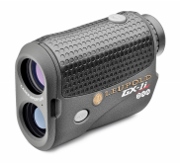
'Leupold GX-1i'

Leupold GX-1i
Not Available


Check Newer Models
Laser
GPS
Golf Watches


Our Leupold GX-1i Review took into account every comment from every single user review we could find… And what we found is yet another solid performer in the Leupold line of golf rangefinders.

Leupold GX-1i User Rating: 4.61 Stars 4.61 out of 5 (18 reviews)

Score compiled from multiple sources.

The small size, accuracy and ease of use were mentioned significantly more than anything else. There was only one all-out negative review and that was from an owner with a defective unit. All other reviews were positive and there were scarce mentions of anything negative. Although a couple of users mentioned that the size of the unit did make it a little harder to hold steady. Even so, they both gave the unit high marks.

Most Mentioned Pros
(in order from high to low):
  • small size
  • accurate
  • easy to use
  • value
  • quality
  • distance to pin and visible objects
  • battery life
  • simplicity
  • prism lock tone
  • lightweight
  • good customer service
  • convenient
  • quick
  • nice case
  • lock feature
  • improves game
  • scan mode
  • legal
  • durable
Most Mentioned Cons
(in order from high to low):
  • requires steady hand for long distance
  • occasionally doesn’t get flag
  • poor warranty service
  • poor quality
Noteworthy Features
  • low glare.
  • scratch resistant.
  • scan feature.
  • proprietary beam geometry – improves laser returns from the pin.
  • advanced GX software accurately separates those returns from objects in the background.
  • prism Lock – on courses that utilize prism technology, scan and the unit will beep and freeze the yardage when it identifies the flag.
  • fog mode works well in fog and rain.
  • accuracy +/- .5 yard/meter
Leupold GX-3i Features and Specifications
Leupold GX-1i
Slope No
Vibration N
Size (Width x Height x Depth) 2.75 in. x 1.5 in. x 4 in.
Weight 6.2 oz.
Battery CR2 Lithium
Battery Life 6,000 Actuations
Display LCD black
Rainproof Yes
Magnification 6x
Maximum Range 800
Minimum Range N/A
Notes Proprietary beam geometry - improves laser returns from the pin.
USGA Compliant (local rule) Yes
Order Golf Rangefinders from Amazon
We work very hard to obtain the correct information about product features, but cannot make any guarantees about the accuracy. Please double check with the merchant or manufacturer before making a purchase.

Pebble Watch Golf App

The Pebble E-Paper Watch has been retired. Check out our current recommendations for today's best golf rangefinders..

Download the Pebble Watch Golf App FreeCaddie Pro

'Pebble E-Paper Watch'

Pebble E-Paper Watch
Not Available


Check Newer Models
Laser
GPS
Golf Watches

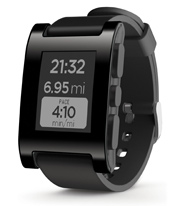
Over the past two years, golf GPS watches have become really popular among golfers, we think largely because of the convenience. There have also been millions of downloads of Smartphone golf GPS apps. We believe that is due to the low price of apps and the many features available. Now there is a watch that is utilizes your smartphone to do things other watches do not do and the Pebble E-Paper Watch will include an app that turns it into a GPS golf watch

Pebble E-Paper Watch User Rating: 3.80 Stars 3.80 out of 5 (2804 reviews)

Score compiled from multiple sources.

The Pebble Smart Watch connects via Bluetooth to your iPhone or Android smartphone to bring some pretty cool features to your wrist. There is no question that being able to change the face of the watch easily and with potentially unlimited choices, is fun, but there is function in this watch too.

It’s also capable of integrating with apps on your phone. Although there are only a few apps today, developers will likely be bringing new ones online all the time. Fortunately, for golfers, runners, cyclist and music lovers, there are apps ready to go.

The free Pebble golf app utilizes FreeCaddie and includes distances to the front, center, and back of the green and has 25,000+ courses preloaded. For the nominal one-time fee of $5.99, bunkers and water hazards are available in FreeCaddiePro.

In our opinion, it’s a slick looking watch, especially when compared with most GPS golf watches. We love the apps that are already available for it, and can’t wait to see what lies in its future. Our only concern is the choice of FreeCaddie as the partner for the golf GPS component. Their reviews on the iTunes store aren’t as strong as we would like to see, but I wouldn’t be surprised to see some other companies develop an app for this watch very soon.

Pebble E-Paper Watch
Course Download Fees No
Pre-loaded with Courses Yes
Full Hole Views Yes
Slope / Elevation N/A
Battery Life 7 days
Battery N/A
Size (Width x Height x Depth) 1.98 in. x 1.3 in. x .33 in.
Measure Shot Distance N/A
Screen Size N/A
Resolution 144x168
Display Type e-paper
Weight N/A oz.
Rainproof waterproof ATM 5
Touch Screen N/A
Touch Targeting N/A
Manual Pin Positioning N/A
Stat Tracker N/A
Digital Scorecard N/A
Computer Analysis Tools N/A
Ground Verified N/A
Alternate Targets N/A
Green Rotates to your shot angle N/A
USGA Compliant (local rule) No
Notes This watch must be used in conjunction with a Smartphone.
Order Golf Rangefinders from Amazon
GolfRangefinderShop.com is a participant in the Amazon Services LLC Associates Program. If you buy anything after clicking through, we get a small commission at no extra cost to you. It helps us keep the site up and running, so thank you! We work very hard to obtain the correct information about product features, but cannot make any guarantees about the accuracy. Please double check with the merchant or manufacturer before making a purchase.

Check Your Version of SkyCaddie SGXw

If you haven’t done an update lately, you may want to check your version of SkyCaddie SGXw. An update was recently released and it includes some good stuff.

To see the latest version that is available for SkyCaddie SGXw, look here.

To see what’s included in the latest update, check here.

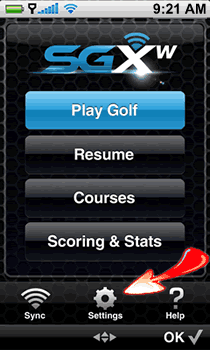
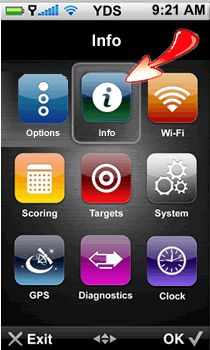
To check your version, go to Settings and then Click “Info”. See images below.

Select the Settings Icon   Select the Info Icon to check your SkyCaddie SGXw Version

The Info option contains information related to your Membership and ID/Version of your SGXW. Membership detail includes: SkyCaddie Membership Plan, Serial Number, and Number of Courses currently stored on your SGXW. The ID/Version screen includes your name, SkyCaddie’s customer support phone number, the SGXw’s unique Serial Number and all applicable software versions currently installed.

Let us know what you think of the latest version in the comments below.

Mobitee GPS Golf App Review

Our Mobitee GPS Golf App Review is based upon its performance on the iPhone 5 with OS 6.01 as well as our observations from iPhone user reviews.

The truth is that the overwhelming enthusiasm in the user reviews that I read made me a little suspicious. However after using the Mobitee Golf App myself, I can give it my personal thumbs up. It’s extremely robust in features and yet super simple to use.

What I liked:

  • Acquires distances very quickly.
  • Has over 34,000 courses in the database.
  • Distance to the front, middle and back of every green stays on the screen even when zooming or touching the screen to change your layup point.
  • The satellite images are very clear.
  • To see a flyover of a hole, it’s a single tap on the screen and one tap to get back to the hole view and distances.
  • You can actually download a course when it’s not even nearby and view every hole.
  • The shot tracking feature is easily utilized with a single tap on the icon in the bottom left corner.
  • The shot tracking integrates with club tracking feature, so you can record how far you hit your shots and specify the club. We think this is a great tool to utilize in practice so that you can learn how far you really hit your clubs. In the bottom left corner of the screen, Mobitee will also suggest a club based on your history.
  • Changing holes is as easy as tapping the hole number (bottom center of screen) and then tapping whatever hole number you want.
  • Choosing your own personal layup points couldn’t be easier. You can tap the screen where you think looks like a good layup point and it displays the distance to that point and then the remaining distance to the center of the green. I really like how the target point easily snaps back to the center of the green if you drag it near the flag.
  • You can change the flag location by zooming in on the green and tapping the location. The only thing I found a little difficult was that after I set my pin position, I sometimes had to move the image to be able to see the distance. Once I figure this out, it was not problem.
  • It’s simple to add putts to the scorecard and the scorecard can be stroke play or Stableford.
  • I noticed quite a few comments about how this app sucked less battery life than other golf GPS apps. I can’t speak to this for sure, as I always run into trouble with my battery life. That’s why I’m an advocate of having the Anker battery backup with me.

If there is anything missing from the Mobitee Golf GPS App, it’s tracking fairways hit and greens in regulation (GIR). I personally think tracking stats during a round, is distracting to most people and don’t feel this is negative. The last thing most golfers need are more distractions.

There is a “rangefinder mode” that sort of simulates the view of a laser rangefinder with distances to various targets, but I didn’t really see any advantage to using it. However some golfers might prefer viewing the hole through that lens.

In summary, I love the Mobitee golf app. For me, any type of golf rangefinder, whether laser or GPS, must be super easy to use and this does a great job. The price is extremely reasonable and includes endless updates. I feel confident recommending the Mobitee Golf GPS App.

Note: Mobitee did provide the app free of charge for us to review. Please know that we will ALWAYS give our honest opinion about every product on this site.

When Are You Allowed to Use a Golf Rangefinder or GPS?

Golf Rule BookThe use of golf laser and GPS rangefinders has become so widespread, that you might not even realize that they are NOT always allowed.

Golf’s ruling bodies, the United States Golf Association (USGA) and Britain’s R&A, have established that beyond the rules of golf that are always in effect, certain “local rules” may be adopted by the local committee. The use of distance measuring devices has long been prohibited by the rules of golf, but in 2006, the USGA and R&A adopted Rule 14/3b, which allowed for the use of rangefinders if specified by “local rule”. Many golf courses have “Local Rules” printed on their scorecard for everyday play and most golf tournaments will have a “Local Rules Sheet” specifying the applicable rules.

The PGA, LPGA and most of the other professional golf tours do no utilize the local rule, so that’s why you don’t see Tiger Woods or Stacy Lewis using one on the weekend. However, you can bet that they and their caddies are using them during preparation and practice rounds. For it’s own tournaments, the USGA also does not allow the use of rangefinders.

The LPGA Legends Tour does allow rangefinders, as do many State Opens. The American Junior Golf Association (AJGA), which runs tournaments for the top junior players in the world, does not allow rangefinders. High School golf associations have had to address the issue and it may vary from state to state or tournament to tournament.

If you compete in tournaments, you will definitely want to check the rules sheet or ask the committee before you tee it up. Club organizations and leagues usually have rules that are always in effect and if you’re unsure, check with the committee or local golf professional

If you’re just playing for fun, check the scorecard for a local rule. If it’s not there and you have any bets, you and your opponents can make the decision together or have the local pro decide. If there are no bets, that’s when you become your own committee and decide that the rangefinder local rule is definitely in effect!

Even with the local rule in effect, certain types of rangefinders are not legal under any circumstances. Get more information in “Is Your Golf Rangefinder Legal“.